What can you do with your podcast data in ChatGPT or Claude?
Turn the numbers you track into a weekly update, useful listener insights or a report worth sharing. Start with a question. Make something you can use.
Ask: “List the podcasts in my Podstatus account.” Then tell it which show to use.
03
Try a question below
Copy a prompt, replace the names in brackets and keep refining the answer in your chat.
GOOD QUESTIONS. USEFUL OUTPUTS.
Six ways to put your podcast data to work.
Copy a starting point, replace the text in brackets and ask a follow-up. Each example uses data available through the Podstatus connection.
01 / Your weekly updateRankings + reviews
How did my podcast do this week?
Turn a week of rankings and reviews into a short briefing. Ask for the biggest changes, the markets worth watching and a few follow-up questions. If your show appears in many charts, name the markets that matter to you so the answer stays focused.
TRY THIS PROMPT
Use Podstatus to find [podcast name]. Start with its chart rankings overview, then choose up to 5 charts that matter most, or use these: [platform, country and category]. For each chart, compare the last 7 complete days with the previous 7 days, stating the exact dates in UTC. Then summarize any reviews from the same 14 days. Give me 3 takeaways and 2 things to investigate. Include source dates and flag missing data. Do not infer downloads or listener growth from chart positions.
↳What you can makeA weekly briefing for you, your co-host or your team. Follow up with: “Make this a 150-word email.”
02 / Listener feedbackReview text + ratings
What are listeners saying, and what could I improve?
Ask your assistant to read your stored listener reviews, group recurring themes and suggest practical improvements. This can help with episode planning, production decisions and finding feedback to discuss with your team.
TRY THIS PROMPT
Use Podstatus to summarize the stored reviews and star ratings for [podcast name]. Then read the review text from the last 90 days. If there are fewer than 10, continue with earlier 90-day periods until you have about 30 reviews or reach the oldest one. Group the feedback by theme, show how many reviews support each theme and include short, exact quotes with their date and country. Separate praise, requests and criticism. Suggest 3 changes to consider. State the period covered and how many reviews you analyzed. Do not invent quotes or treat reviewers as representative of all listeners.
↳What you can makeA listener-feedback summary with evidence behind each suggestion. Follow up with: “Turn those suggestions into an agenda for our next planning meeting.”
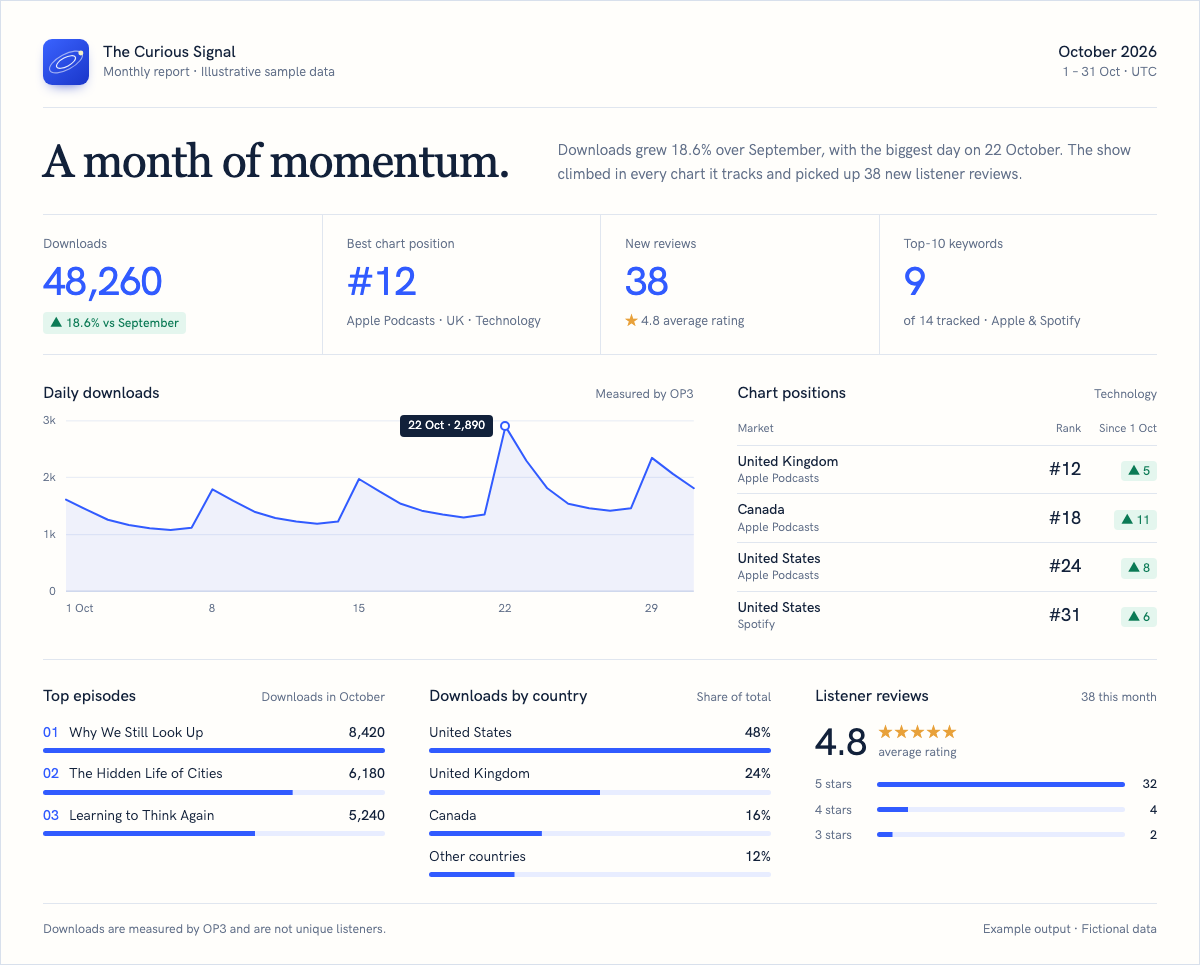
Yes. Ask ChatGPT or Claude to organize the available data into a chart, a table or a report you can share with a client. In Claude, you can ask for an artifact. The layout and export options depend on the tools enabled in your assistant. Start with a monthly snapshot, then refine the design in the same conversation.
TRY THIS PROMPT
Use Podstatus data for [podcast name] to build a one-page report for the last complete calendar month, compared with the month before. Include up to 5 ranking highlights with platform, country and category, tracked keywords in the top 10, and new reviews with their average rating. If OP3 data covers that month, add daily downloads, the top episodes by downloads and downloads by country. Show the exact dates, sources and missing-data notes. Use a clean layout with a short executive summary, charts and 3 next steps. Create the report in this chat; do not generate a paid Podstatus report.
↳What you can makeA report draft you can review and adapt for a client, team or sponsor. Ask for your brand colors, a shorter summary or a table alongside each chart.
FROM DATA TO SOMETHING YOU CAN SHAREExample output
A report layout you could ask your assistant to create. Fictional data, shown for illustration; the exact output depends on your AI tool. View full-size example ↗
04 / Podcast comparisonsRankings for tracked podcasts
How does my show compare with other podcasts I track?
Compare shows already tracked in your Podstatus account to see which gained or lost chart positions. Keep the platform, country, category and dates the same. This is useful for a competitive check-in or a quick overview of an agency portfolio.
TRY THIS PROMPT
Find [podcast A] and [podcast B] in my Podstatus account. Compare their Apple Podcasts rankings in [country] and [category] over the last 30 complete days. Confirm that this chart is supported for both shows. Use matching dates, show the trend in a table or chart, and highlight the largest changes. A lower rank is better. Show days without a position as gaps: they are not observed, which is not the same as unranked or a drop. Do not estimate competitors’ downloads from rankings.
↳What you can makeA comparison based on the same chart and period. Follow up with: “Apply the same comparison to the other shows in my account.”
05 / Downloads & episodesRequires connected OP3 data
Which episodes and markets deserve a closer look?
When OP3 is connected, bring downloads, episode performance and available audience breakdowns into the conversation. Use the results to choose an episode to promote or identify a country worth investigating. Downloads are not a count of unique listeners.
TRY THIS PROMPT
Check the OP3 data dates for [podcast name] in Podstatus. Use the last complete calendar month, or the latest complete month with OP3 data if that is earlier. Show daily downloads, the top 5 episodes by downloads in that period and the available country breakdown. Include episode publication dates so older episodes have context. Suggest 2 promotion ideas supported by the data. Label downloads as downloads, not unique listeners, and state any missing data or limitations.
↳What you can makeA starting point for promotion and editorial planning. Follow up with: “Draft a sponsor update using only the figures we have verified.”
Can this help with podcast discovery and content ideas?
Use your tracked keyword rankings to see how your show appears for the searches you monitor. Combine that with listener feedback to brainstorm clearer descriptions and future episode topics. Treat the suggestions as ideas to review, rather than a promise of higher rankings.
TRY THIS PROMPT
List the keywords tracked for [podcast name] in Podstatus. For each one, show the latest position by platform and country with its date, and the change from about 30 days earlier. Treat keywords without a position as not observed. Combine this with themes from recent reviews to suggest 5 episode ideas and 2 description drafts. Separate observations from suggestions. Do not invent search volume or claim a wording change will improve rankings. Ask me for the current description if you need it.
↳What you can makeAn editorial shortlist grounded in your own tracking and feedback. Follow up with: “Keep our tone of voice and explain the evidence behind each idea.”
PREFER YOUR OWN DASHBOARD?
Bring the same data into your company’s tools.
The MCP connection is for conversations. For a dashboard, spreadsheet or alert that updates on its own, call the Podstatus API from your server.
A daily company dashboard
Refresh a spreadsheet, Looker Studio, Metabase or your internal dashboard once a day with chart positions, downloads and review ratings.
GET /podcasts/{id}/rankings/overview
GET /podcasts/{id}/downloads
GET /podcasts/{id}/reviews/summary
About 3 requests per podcast per day.
Chart movement alerts
Check the charts you care about each day and post to Slack or Teams when a position changes by more than you choose.
GET /podcasts/{id}/rankings/latest
GET /podcasts/{id}/rankings/summary
A positive change means the show moved up.
A portal for your clients
Show every client their own podcast in your agency portal. Fetch on your server, save the results and serve each visitor from that copy.
GET /podcasts
GET /rankings/latest
GET /podcasts/{id}/reports
Latest rankings for up to 5 podcasts count as one request.
You need a Professional or Network Podstatus account and a ChatGPT or Claude account that allows custom MCP connections. Your assistant’s plan and workspace settings determine access to those connections and to features such as charts or file creation. Any subscription to the assistant is separate from Podstatus.
Can I use it now, or do I need to wait for a plugin?
You can connect through the Podstatus MCP server today. The public ChatGPT and Claude plugin listings are coming soon. The prompts on this page work with a compatible MCP connection; you do not need to wait for a public listing.
Do I need to code or paste spreadsheets into the chat?
No coding is needed for the workflows on this page once the connection is set up. Your assistant can request the data from Podstatus as you ask questions. MCP is simply the connection that makes this possible. Use the API if you want to keep a company dashboard, spreadsheet or alert up to date automatically, or to build your own application.
What data can ChatGPT or Claude access?
The connection can read the podcasts in your account and the data covered by the permissions you grant: chart rankings and history, stored reviews, tracked keyword rankings and available OP3 analytics. Downloads and audience breakdowns require OP3. Availability depends on what you track and what has been collected; connecting an assistant does not create missing history.
Does asking for a summary spend a Podstatus report credit?
An ordinary answer, chart or draft created by the assistant from retrieved data does not use a Podstatus report credit. Reading data uses your shared API/MCP request allowance. Generating a report through Podstatus is a separate action: it requires report-write permission, your explicit request and a report credit.
How many requests does a prompt use?
Most prompts on this page use between 3 and 15 requests from your shared API/MCP allowance. Professional includes 20 requests per minute and 1,000 per UTC day; Network includes 40 and 2,000. If your show appears in many charts, name the countries and categories you care about so the assistant does not request every chart.
Will it automatically email a report every week?
Connecting Podstatus alone does not schedule a recurring task or send an email. You can ask for a draft in your chat and share it yourself. For recurring delivery, use Podstatus’s email reports or configure a separate automation with the appropriate tools and permissions.
Can the assistant change my account or make my data public?
The default MCP connection has read access. It does not edit your podcasts or publish your data. Report generation needs a separate permission. Data retrieved in a chat is processed by your chosen AI provider under your account and workspace settings. You control whether you share the resulting conversation or report, and you can revoke the connection in Podstatus API settings.
What should I check before sharing an AI-generated report?
Check the podcast, date range, platform, country and category against the source data. A lower chart number is better; missing data is not zero; downloads are not unique listeners. Ask the assistant to show its sources and separate facts from suggestions. A change in rankings does not, by itself, explain why it happened or prove audience growth.
Podstatus uses its own and third party cookies to allow the website function properly, for analytical purposes and to show you personalized advertising based on a profile drawn up from your browsing habits. You can configure or reject all cookies by clicking the "Manage" button. Or you can accept all cookies by pressing the "Accept" button. For further information you can visit our Cookie Policy.
Cookie settings
Our website keeps three levels of cookies. You can adjust your preferences at any time. If you want more information about what cookies are and which cookies we collect, please read our cookie policy.
are essential cookies that ensure that the website functions properly and that your preferences are saved.
allow us to analyse website use and to improve the visitor's experience.
allow us to personalise your experience and to send you relevant content and offers, on this website and other websites.